





How to Build a Case Management Intake Form That Actually Works
What a Case Management Intake Form Is (And Why It Makes or Breaks Your Client Onboarding)
A case management intake form is the first document a client completes when entering your system — and it sets the tone for everything that follows. Whether you work in healthcare, social work, or a law firm, this form captures the critical details your team needs to assess needs, assign resources, and start delivering results.
Here’s what a case management intake form typically includes:
- Client demographics — full name, date of birth, contact details, preferred communication method
- Presenting problem — the reason the client is seeking services
- Referral source — how or who sent them to you
- Medical or legal history — relevant background depending on your industry
- Risk assessment — screening for urgent safety concerns
- Consent and privacy declarations — signed acknowledgment before services begin
Most professionals use one of these formats:
| Format | Best For |
|---|---|
| Fillable PDF | Solo practitioners, simple workflows |
| Online form (e.g., Jotform) | High volume, automated workflows |
| CRM-integrated digital form | Law firms, multi-location practices |
| Paper form | Settings without reliable internet access |
The stakes are real. According to research from Pabau, standardized digital intake forms reduce completion time from 30–40 minutes down to just 15–20 minutes — and save an additional 10–15 minutes per client by eliminating manual data re-entry.
For law firms in particular, a weak intake process isn’t just inefficient — it’s a revenue problem. Research shows that nine out of ten failures to grow accepted cases alongside increasing leads trace back to a lack of a formalized intake process.
A well-built form doesn’t just collect data. It qualifies leads, protects your firm legally, and tells the client you’re organized and trustworthy from the very first interaction.
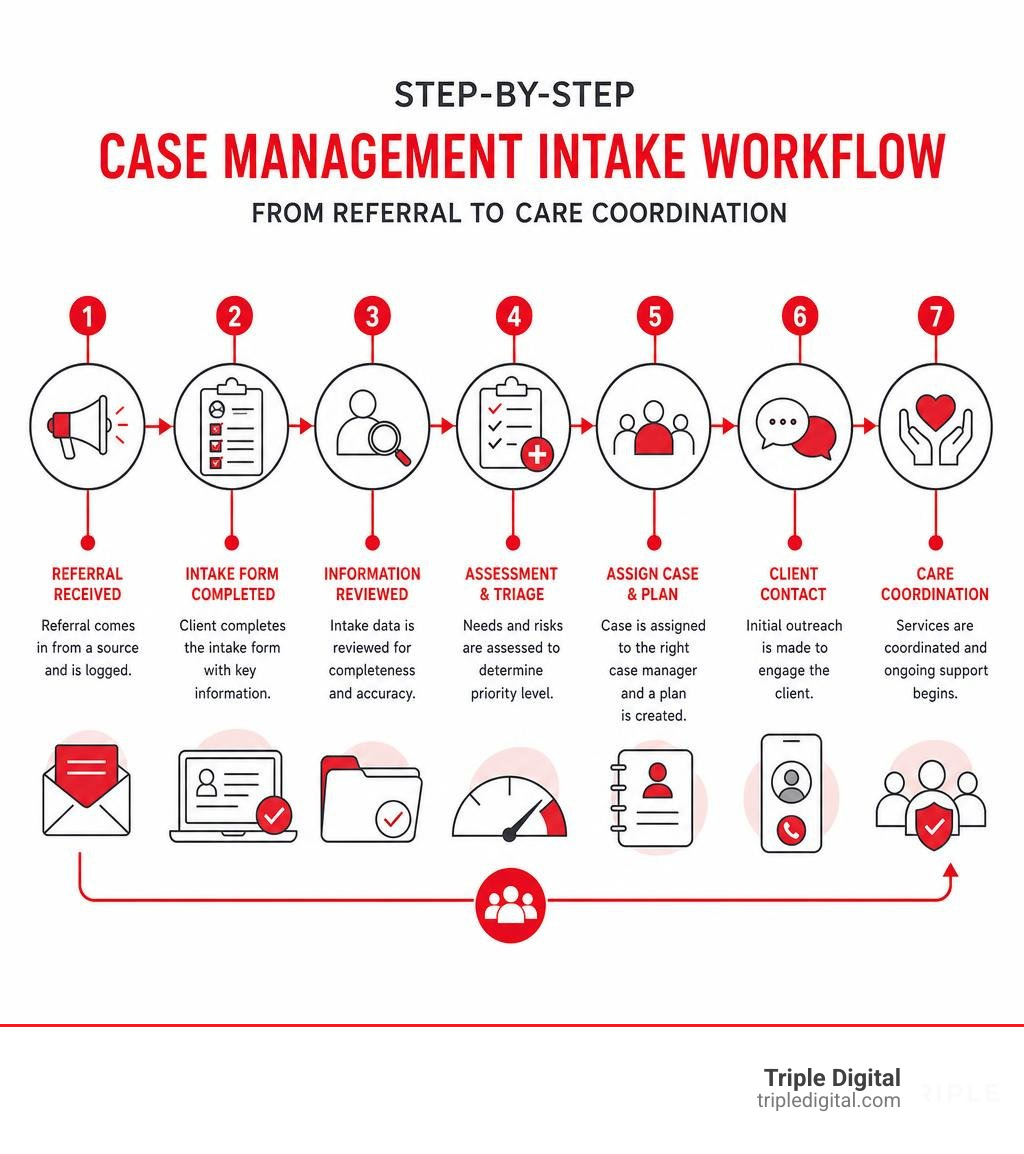
Essential Sections of a Case Management Intake Form
To design a case management intake form that functions smoothly, you must structure it logically. Think of your intake form as a funnel: it starts with broad, easy-to-answer demographic questions and gradually narrows down to specific, highly sensitive details.
When we help firms optimize their intake workflows, we emphasize grouping questions into distinct modules. This reduces cognitive load for the client and makes it much easier for your staff to scan the completed document.
Every professional intake form should be built around these foundational sections:
- Demographics & Contact Information: The basic identity of the client.
- Emergency Contacts: Who to reach in an emergency, including a crucial safety check: Is this contact aware of the client’s current situation?
- Referral Source: Essential for tracking your marketing ROI and maintaining professional referral relationships.
- The Presenting Problem: A structured space (often combining checkboxes and open text fields) where the client explains why they are seeking help.
- Initial Risk Assessment: A quick screening section to flag immediate safety, housing, or medical crises (such as a 0–10 “stress thermometer” scale to gauge acute distress).
- Consent & Privacy Disclosures: The legal foundation of your relationship, covering confidentiality, data security, and terms of service.
To keep your primary form clean and prevent user fatigue, we recommend separating your intake architecture into “Core” sections (required for everyone) and “Optional” modules (triggered only when necessary).
| Core Intake Sections (Required) | Optional/Conditional Modules (As Needed) |
|---|---|
| Full Legal Name & Preferred Pronouns | Detailed Financial & Income Status |
| Secure Contact Details (Phone, Email) | Cultural & Language Safety Requirements |
| Discretion & Communication Preferences | Prior Legal, CPS, or Incarceration History |
| Primary Emergency Contact | Comprehensive Substance Use Screening |
| Core Presenting Problem / Incident Details | Secondary Insurance / Medicaid Eligibility |
| Signed Consent & Privacy Policy | Multi-Disciplinary Care Coordination Notes |
Core Fields for Every Case Management Intake Form
While the overall structure of your form matters, the magic is in the details. There are several highly practical, easily overlooked fields that can make or break your ongoing communication with a client.
- Preferred Name & Pronouns: Building a positive client relationship starts with respect. Asking for a preferred name ensures your staff addresses clients correctly from day one.
- Communication Preferences & Discretion Requirements: This is a major safety and privacy field. Your form should explicitly ask: “Is discretion required when contacting you?” and “Is it safe to leave a voicemail or text message at this number?” For clients dealing with sensitive medical issues or domestic disputes, an unannounced voicemail can compromise their privacy or safety.
- Insurance and Billing Details: Capture primary and secondary policy providers, group numbers, and policyholder details upfront to prevent billing bottlenecks.
- Multilingual Accessibility: If you serve a diverse community, offering your intake forms in multiple languages is essential. For example, if you run a personal injury practice in Texas, having a dedicated Spanish Form Pi ensures you don’t alienate Spanish-speaking clients during their first point of contact.
Industry-Specific Customizations for Healthcare, Social Work, and Legal Teams
A generic intake form rarely gets the job done. Depending on your field, your case management intake form must be customized to capture specialized data points.
Healthcare and Mental Health Settings
Clinical case managers rely on a Biopsychosocial Assessment framework. This evaluates the biological, psychological, and social factors contributing to a patient’s health. In these forms, you will need detailed fields for medical histories, current medications, lifestyle habits (sleep, exercise, alcohol use), and validated mental health screening questions.
Social Work and Community Services
Social workers frequently utilize a SNAP Assessment (Strengths, Needs, Abilities, Preferences) to evaluate a client holistically. Because social determinants of health play a massive role in social work, these forms place a heavy emphasis on:
- Housing stability (rent vs. own, history of moves, subsidized housing status)
- Financial benefits (tracking SSI, SSDI, SNAP/Food Stamps, and utility assistance)
- Transportation barriers (assessing if a client misses appointments due to a lack of transit options or gas money)
Legal Teams and Law Firms
In the legal industry, intake serves as both a screening tool and a protective shield. Your form must prioritize:
- Conflict of Interest Checks: Before your team spends hours reviewing a case, you must collect the names of all adverse parties to ensure your firm has no conflicts.
- Statute of Limitations Verification: You must capture exact dates (e.g., date of an accident or contract breach) to confirm the case is still legally viable.
- Structured Incident Details: Gathering the “who, what, where, and when” immediately.
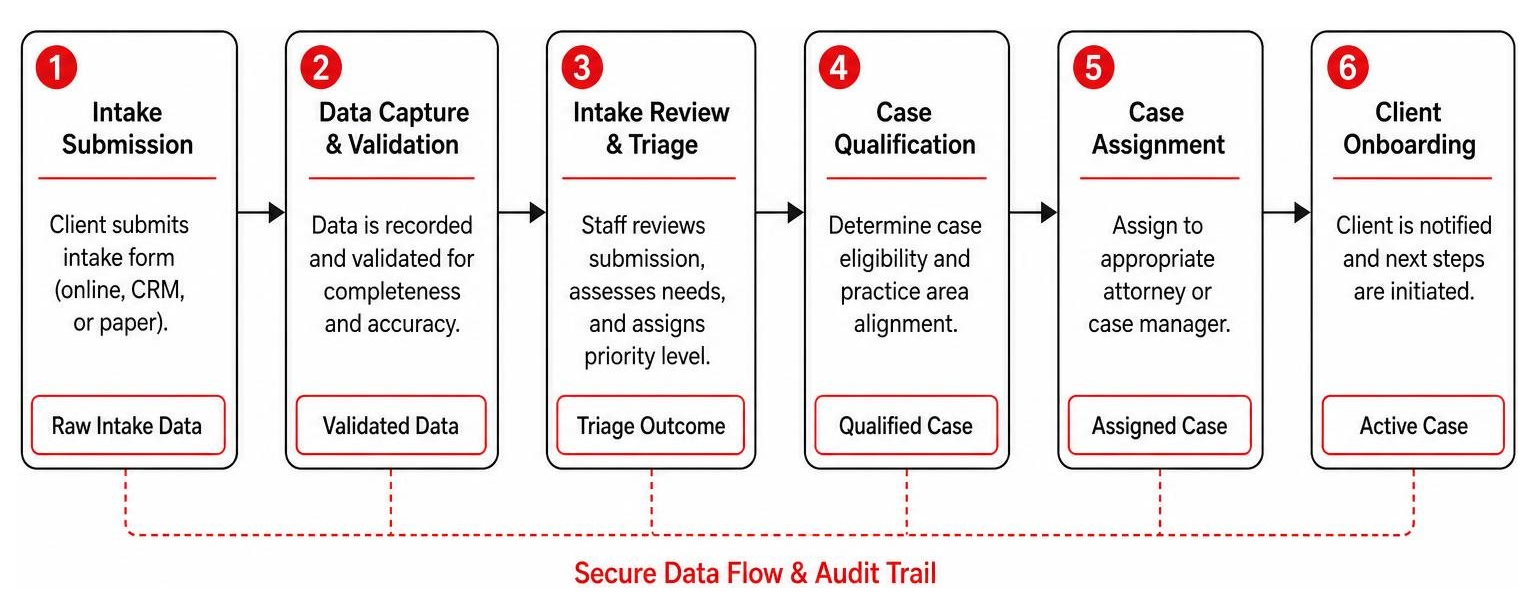
To build an airtight legal intake system, you must align your form with a structured sequence of Legal Intake Process Steps to ensure no lead falls through the cracks.
Best Practices for Designing a User-Friendly Intake Form
Let’s be honest: nobody likes filling out forms. If your intake document is a cluttered, ten-page wall of text, clients will abandon it, enter inaccurate data, or call your office out of frustration. Good design is directly tied to your bottom line.

To maximize completion rates and ensure data accuracy, apply these design best practices:
- Use Conditional Logic: This is the single most powerful tool for digital forms. Conditional logic dynamically hides or shows fields based on previous answers. For example, if a client checks “No” to “Are you currently employed?”, the form should automatically skip questions about employer details. This keeps the form short and highly relevant.
- Incorporate Progress Indicators: If your form has multiple pages, show a clear progress bar (e.g., “Step 2 of 5”). This simple psychological cue reduces form fatigue and encourages users to finish.
- Optimize for Mobile Devices: Many clients do not have easy access to a desktop computer, or they prefer completing forms on their smartphones. Ensure your digital forms use responsive design, large touch-friendly buttons, and vertical layouts.
- Provide Clear Instructions and Helper Text: Use small tooltips or helper text below complex fields (e.g., explaining where to find a policy number on an insurance card) to prevent user errors.
- Keep It Visually Clean: Use a professional, limited color palette (a simple three-color scheme works best) and plenty of white space.
Your intake form is often the actual gateway to your website’s conversion experience. If you want to see how high-performing digital layouts translate to real-world business growth, check out our guide on How To Design The Best Websites For Law Firms That Actually Convert.
Transitioning from Paper to Digital Case Management Workflows
If your office is still handing physical clipboards to clients or emailing blank PDFs for them to print, sign, scan, and email back, it is time for an upgrade.
Transitioning to a fully digital intake workflow offers massive advantages:
- Instant Data Accuracy: Digital forms eliminate the nightmare of trying to decipher messy handwriting. Clients type their own information, which is validated in real-time (e.g., ensuring phone numbers have the correct number of digits).
- Automated System Integration: Instead of manually typing intake data into your Electronic Health Record (EHR) or Customer Relationship Management (CRM) platform, digital forms can automatically push data directly into your database.
- Real-Time Notifications: The moment a new client submits a form, your case managers receive desktop or email notifications, allowing them to follow up instantly.
- Enhanced Data Security: Physical paper forms sitting in file cabinets are vulnerable to theft, loss, and unauthorized viewing. Digital platforms store encrypted data in secure cloud systems.
For medical and social service providers, digital intake must comply with strict HIPAA guidelines. This means utilizing end-to-end encryption, secure data transmission, and role-based access controls (ensuring only authorized staff members can view sensitive Protected Health Information).
For legal teams, choosing the right digital tools is just as critical. To navigate the crowded software market, read our comprehensive guide on How To Choose The Best Law Firm Intake Software Without Losing Your Mind.
Common Mistakes to Avoid in Your Case Management Intake Form
When designing or updating your case management intake form, watch out for these common pitfalls:
- Overwhelming Your Clients Too Early: Asking for too much highly sensitive or complex information on page one will cause clients to abandon the form. Keep initial questions simple and save deep-dive questions for later sections.
- Failing to Automate Data Entry: If your administrative staff is still copying data from an email notification and pasting it into your case files, you are wasting hours of billable time and inviting data-entry mistakes.
- Neglecting Security and Encryption: Sending completed intake forms containing medical, financial, or personal details over standard, unencrypted email is a major compliance risk. Always use secure, encrypted portals.
- Omitting Explicit Consent and Signature Fields: Never begin services or process sensitive client data without a legally binding electronic signature acknowledging your privacy policies and terms of service.
By cleaning up these common friction points, you can dramatically improve the onboarding experience. To dive deeper into how a streamlined onboarding process directly impacts your business, read our article on Enhancing Client Satisfaction And Firm Profitability Optimizing The Intake Process.
Frequently Asked Questions About Case Management Intake
How long should completed intake forms be retained?
In most jurisdictions, standard case management records — including the initial intake form — must be retained for 6 to 7 years following client discharge or the final point of contact. However, rules vary by state and industry. For example, records involving minors must often be kept until the individual reaches the age of 18 plus an additional 6 years. Always check your local licensing board or state bar guidelines, and establish a strict protocol for the secure, permanent destruction of records once the retention period expires.
How do digital intake forms improve workflow efficiency?
Digital forms eliminate manual data entry, saving an average of 10 to 15 minutes per client for your administrative staff. They also improve data integrity, auto-populate recurring fields across multiple documents, and can use automated triggers (like flagging high-risk answers) to immediately alert case managers to urgent situations.
What security standards must digital intake forms meet?
If you collect Protected Health Information (PHI), your forms and storage systems must be fully HIPAA compliant. This requires 256-bit encryption for data in transit and at rest, secure cloud hosting, signed Business Associate Agreements (BAAs) with your form software provider, and role-based access controls so only assigned personnel can view sensitive client details.
Transform Your Client Acquisition and Intake Process Today
Building a brilliant case management intake form is only half the battle. If your firm isn’t generating a steady stream of high-quality leads to fill that intake pipeline, your business can’t scale.
That is where we come in. At Triple Digital, we are a Houston-based digital marketing agency specializing in high-precision lead generation and case acquisition for law firms. Our results-driven, “less fluff, more cases” approach leverages advanced data mining and targeted digital strategies to connect your firm with the clients who need you most.
We don’t just help you get clicks — we help you design the seamless digital conversion pathways that turn those clicks into signed, profitable cases.
Ready to streamline your client acquisition and grow your firm’s caseload? Schedule Meeting with our team of experts today, and let’s build a high-converting intake system that works for you.