





Stop Leaking Leads: 13 Ways to Increase Conversion Rate
Why Most Law Firm Websites Lose 97% of Their Visitors (And How to Fix It)
To increase conversion rate on your website, focus on these high-impact actions:
- Speed up your pages — every 1-second delay costs ~7% in conversions
- Simplify your forms — cutting fields from 11 to 4 can lift sign-ups by 120%
- Add trust signals — testimonials near a CTA can boost conversions by 34%
- Fix your CTA copy — replace “Submit” with something specific like “Get My Free Consultation”
- Optimize for mobile — mobile converts at 1.8% vs 3.9% on desktop for most sites
- Remove distractions — fewer menu items and pop-ups means more focus on the one action that matters
- Show all costs upfront — unexpected fees are a top reason visitors abandon without converting
Here’s a hard truth: the average website converts just 2–3% of its visitors. That means roughly 97 out of every 100 people who land on your site leave without taking any action.
For law firms, this is especially costly. You may be paying $200–$900 per lead through paid search. If your website isn’t converting, that spend disappears with nothing to show for it.
The good news? You don’t need more traffic to get more clients. You need to do more with the traffic you already have.
That’s exactly what conversion rate optimization (CRO) is about. And companies that invest in it report an average ROI of 223% — not from spending more on ads, but from making smarter use of every visit.
This guide walks you through exactly how to do that.
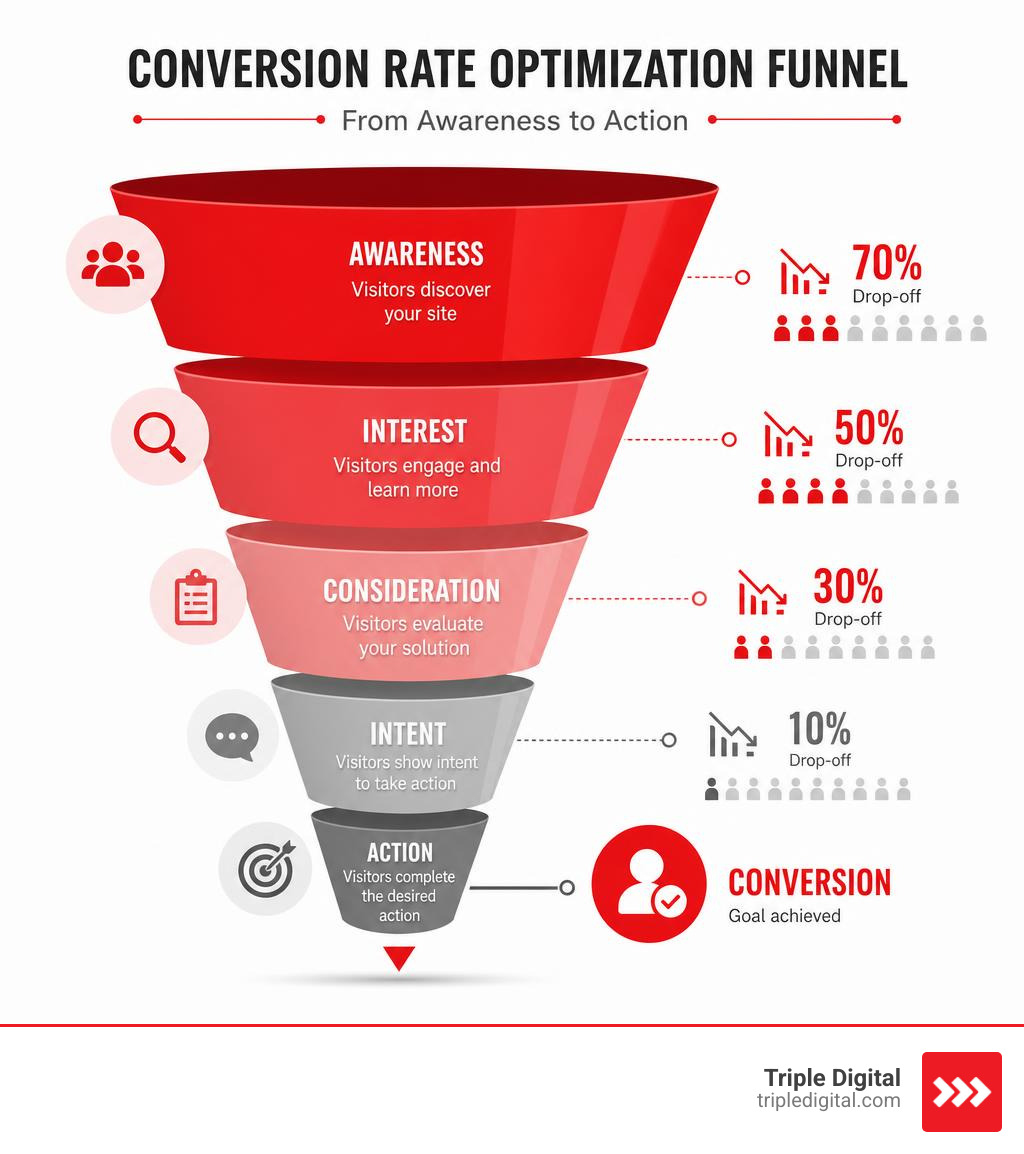
What is Conversion Rate Optimization and Why It Matters in 2026
Conversion Rate Optimization (CRO) is the systematic process of increasing the percentage of website visitors who take a specific, desired action. In 2026, CRO is no longer a luxury; it is a survival requirement.
With overall website conversions dropping by 6.1% in 2025, businesses are finding that traditional, traffic-only acquisition strategies are becoming unsustainably expensive. Ad platforms have raised their costs, meaning you must convert more of the traffic you already have to stay profitable.
To design a successful optimization program, you must first understand the difference between the two main types of conversions:
- Macro Conversions: These are your ultimate business goals. For a law firm, a macro conversion is a completed consultation request, a signed retainer, or a direct phone call from a prospective client. For an e-commerce brand, it is a completed purchase.
- Micro Conversions: These are smaller steps that indicate intent and build trust along the user journey. Examples include downloading an educational guide, signing up for an email newsletter, viewing a key case results page, or spending more than three minutes reading a detailed blog post.
By tracking and optimizing both macro and micro conversions, you gain a complete view of how users interact with your brand. When you focus on the data, you stop guessing and start building a website that works around the clock. For a deeper dive into establishing a metrics-first approach, read our guide on Data-Driven Legal Marketing.
Current Benchmarks Across Industries
Before you can work to increase conversion rate metrics, you need to know where your business stands compared to your peers. Conversion benchmarks vary wildly depending on the complexity of the purchase decision and the level of trust required to take action.
For example, B2B SaaS conversion rates sit at a modest 1.1% because software purchases typically involve multi-step, high-consideration approval processes. On the other end of the spectrum, legal services boast the highest B2B category conversion rate at 7.4% because people searching for legal help often have immediate, high-intent needs.
Here is a breakdown of industry benchmarks in 2026:
| Industry / Category | Average Conversion Rate | Top 10% Performers |
|---|---|---|
| Legal Services | 7.4% | 11.4%+ |
| Professional Services | 4.6% | 8.5%+ |
| E-commerce (B2C) | 1.9% – 2.5% | 4.7%+ |
| B2B SaaS | 1.1% | 3.5%+ |
| Overall Industry Average | 3.3% | 10.0%+ |
The Four Main Conversion Inhibitors
If your website is struggling to hit these benchmarks, it is likely because your visitors are running into one of the four psychological conversion barriers. To fix them, we must look at your site through the eyes of a skeptical prospect:
- Friction: This is the physical or cognitive effort required to complete an action. Long, complicated forms with 11 different fields, slow-loading pages, and forced account creation are classic examples of friction.
- Anxiety: This is the fear or doubt a visitor feels about taking the next step. Is my personal data safe? Will they spam me? Are they actually qualified to handle my legal case? If you do not display trust signals, secure badges, or reviews, anxiety will kill your conversions.
- Distraction: When you give visitors too many choices, they choose nothing. A homepage with 12 competing calls-to-action (CTAs), a chaotic navigation menu, and multiple pop-ups creates visual noise that pulls people away from the primary goal.
- Ambiguity: If a visitor lands on your page and cannot figure out what you do within three seconds, they will leave. Vague headlines, confusing industry jargon, and hidden contact buttons generate ambiguity.
To systematically diagnose where these inhibitors are hurting your performance, you must rely on behavioral analytics. For a complete blueprint on how to look past surface-level traffic and find structural leaks, explore our guide on how to Measure Up: How Analytics Can Transform Your Legal Marketing.
Proven Strategies to Increase Conversion Rate on Your Website
To successfully increase conversion rate numbers, you must replace guesswork with evidence-based adjustments. Start by clarifying your value proposition, matching user intent, and streamlining your calls to action.

A high-converting landing page relies on a clean, logical structure:
- The Headline: Needs to be exceptionally clear. Instead of using clever corporate jargon, use a simple, benefit-focused headline that answers: What do you do, who is it for, and what is the primary benefit?
- The Call to Action (CTA): Make your buttons pop with high-contrast colors and action-oriented language. Generic text like “Submit” or “Click Here” triggers user hesitation. Instead, use specific, low-friction phrases like “Get My Free Case Review” or “Claim My Free Guide.”
- The Layout: Keep your most critical information above the fold. Research shows that up to 60% of website visitors never scroll past the hero section.
How to Use Social Proof to Increase Conversion Rate
Trust is the ultimate conversion currency. Over 80% of users state they are more likely to buy from or hire a business that feels highly trustworthy. If your landing pages do not showcase proof of your success, visitors will go to a competitor who does.
High-impact social proof strategies include:
- Strategic Testimonial Placement: Don’t hide your best reviews on a dedicated “Testimonials” page that no one visits. Instead, place a highly relevant, emotional quote directly next to your primary CTA button. This simple adjustment can increase conversions by 34%.
- Specific Case Studies: Back up your claims with hard data. For law firms, this means highlighting specific, verifiable case results (without violating client confidentiality).
- Trust Badges and Security Signals: Display recognized security seals, professional association badges, and third-party rating stars near your forms to immediately lower user anxiety.
To learn how to structure these trust elements specifically for legal clients, check out our comprehensive guide on From Clicks to Clients: The Ultimate Law Firm CRO Strategy.
Streamlining Forms to Increase Conversion Rate
Your contact forms are the gateway to your business. Yet, this is where most websites suffer their worst drop-offs. If your intake forms feel like a tax audit, visitors will abandon them.
Consider these incredible statistics on form optimization:
- Reducing a standard contact form from 11 fields to 4 can increase sign-ups by 120%.
- Reducing checkout form fields from 6 to 3 can raise e-commerce conversions by 50%.
To optimize your intake experience, follow these rules:
- Ask Only for What You Need: Do you really need their mailing address and fax number just to schedule an initial phone call? Save the deep-dive questions for the actual consultation.
- Use Multi-Step Forms: If you must collect detailed information, break the form into two or three visually clean steps with a progress bar. This reduces cognitive load and keeps the user engaged.
- Enable Auto-Fill and Inline Validation: Make it easy for mobile users to complete forms by supporting browser auto-fill and showing green checkmarks as they fill out fields correctly.
To optimize your intake process to boost both client satisfaction and firm revenue, read our guide on Enhancing Client Satisfaction and Firm Profitability: Optimizing the Intake Process.
Technical and UX Optimization for Maximum Conversions
No matter how beautiful your website is or how compelling your copy is, technical flaws will destroy your conversion rates. If your site is slow or difficult to use on a smartphone, visitors will click away before your headline even loads.
Page Speed and Performance Tuning
In 2026, user patience is at an all-time low. Every second of delay on your page load time directly erodes your bottom line.
- A 1-second delay in load time causes an average 7% reduction in conversions.
- At 3 seconds of load time, users are 32% more likely to bounce entirely.
- At 6 seconds of load time, that bounce likelihood jumps to a massive 106%.
To protect your conversion rates, aim for a Core Web Vitals “Largest Contentful Paint” (LCP) of under 2.5 seconds. You can achieve this by compressing your images to modern formats like WebP, deferring non-critical JavaScript, minifying your CSS files, and utilizing a Content Delivery Network (CDN) to serve your site faster to local users.
Mobile-First Design and Usability
Mobile devices account for over 60% of all web traffic, yet mobile conversion rates are typically 50% lower than desktop rates (1.8% on mobile vs 3.9% on desktop). This conversion gap exists because many sites are designed for desktop screens first and shrunk down as an afterthought.
To build a high-converting mobile experience, implement these design principles:
- Thumb-Friendly Layouts: Place your primary navigation and CTA buttons within easy reach of a user’s thumb.
- Oversized Tap Targets: Ensure all buttons are at least 44×44 pixels so users don’t accidentally click the wrong link.
- Sticky CTAs: Keep a simplified “Call Us” or “Book Now” button anchored to the bottom of the screen as the user scrolls down your long-form content.
Frequently Asked Questions About Conversion Rates
What is a good conversion rate for a website in 2026?
A good conversion rate is highly dependent on your industry, traffic source, and business model. While the overall average across all web industries sits around 3.3%, top-performing websites regularly achieve conversion rates of 10% to 11% or higher through systematic optimization. Instead of obsessing over industry averages, focus on improving your own baseline. A 1% absolute improvement on a site with a 3% baseline represents a 33% increase in total leads and revenue without spending an extra dime on traffic.
How long should an A/B test run to get accurate results?
For your tests to be mathematically valid, you must run them for a minimum of 14 to 28 days to account for weekly business cycles (as user behavior varies significantly between weekdays and weekends). Additionally, you should never declare a winner until your testing software shows at least a 95% statistical confidence level and you have accumulated a minimum of 1,000 conversions per variant.
How does page speed affect conversion rates?
Page speed is the foundation of user experience. When a page loads slowly, it creates immediate user frustration, leading to high bounce rates. According to Google and industry data, every single second of page load improvement can lift your conversions by up to 20%.
Conclusion
To increase conversion rate metrics on your website, you do not need a massive redesign or a larger marketing budget. You simply need to remove the friction, anxiety, and distraction that are currently pushing your hard-earned visitors away.
By implementing clear value propositions, highlighting strong social proof, streamlining your contact forms, and optimizing for mobile speed, you can turn your website into a highly efficient lead-generation machine.
At Triple Digital, we believe in a “less fluff, more cases” approach. We combine advanced data analysis with cutting-edge user psychology to help law firms maximize their client acquisition. For a complete guide on how to turn your data into signed cases, check out Crunching Numbers, Winning Cases: Your Guide to Data-Powered Lead Gen.
Ready to scale your business? Partner with Triple Digital for conversion optimization services.