





How to Put Your Practice on Autopilot with Law Firm Process Automation
The Hidden Cost of Manual Work
Law firm process automation is the use of technology to handle the repetitive, time-consuming tasks that pull lawyers away from actual legal work — things like client intake, document drafting, billing, deadline tracking, and internal handoffs.
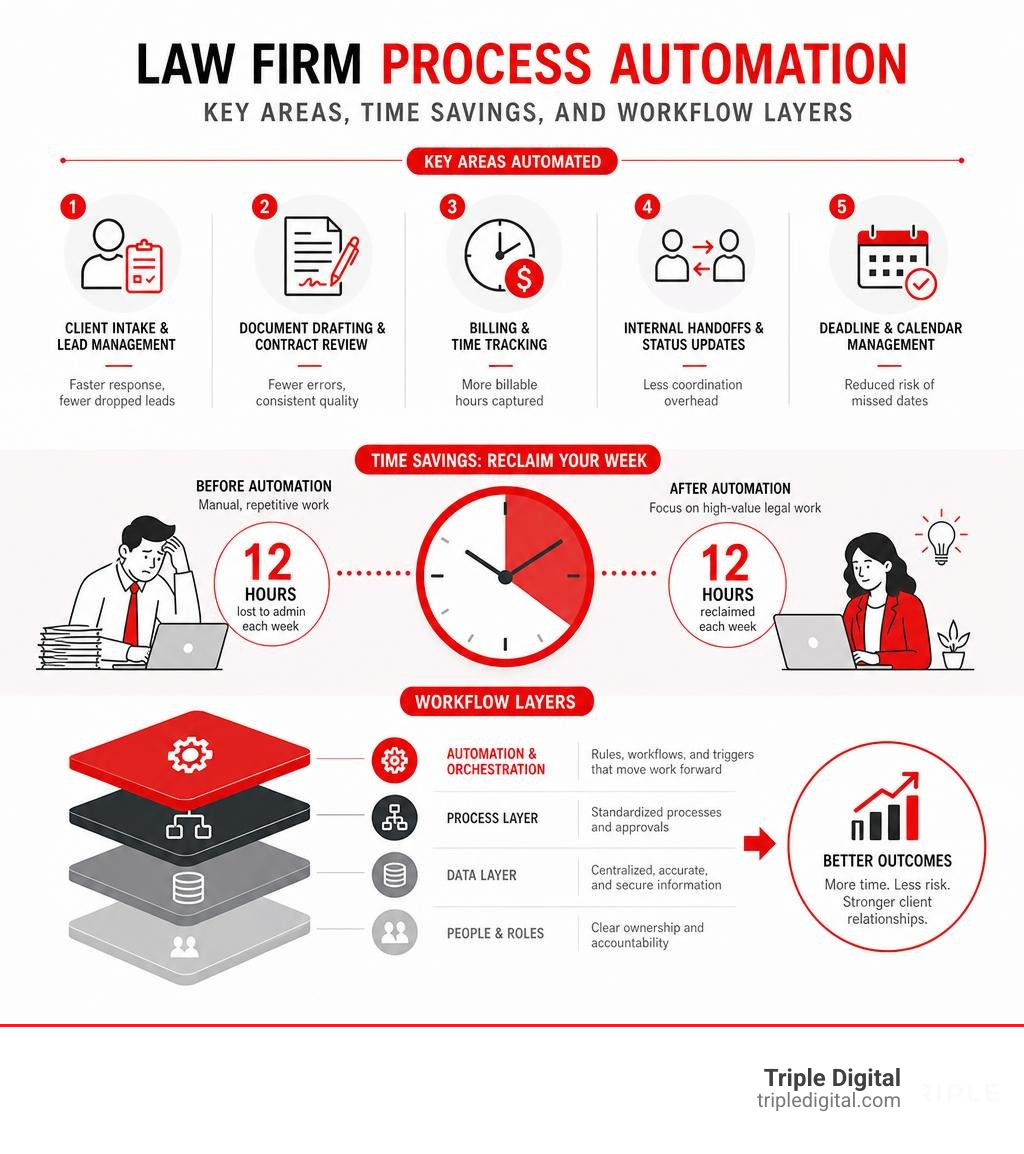
Here’s a quick breakdown of what it covers and why it matters:
| What It Automates | Why It Matters |
|---|---|
| Client intake and lead management | Faster response times, fewer dropped leads |
| Document drafting and contract review | Fewer errors, consistent quality |
| Billing and time tracking | More billable hours captured |
| Internal handoffs and status updates | Less coordination overhead |
| Deadline and calendar management | Reduced risk of missed dates |
Think about this: the average lawyer works 49 hours a week but only bills for 37 of them. That’s 12 hours — every single week — swallowed by admin, follow-ups, and coordination that never shows up on an invoice.
And it gets worse. A survey of over 2,500 attorneys found that email alone consumes 66% of the working day. Not legal analysis. Not client strategy. Email.
This isn’t a time management problem. It’s a systems problem.
Most law firms are running sophisticated legal practices on a patchwork of manual processes, sticky notes, and Microsoft Word checklists. The work doesn’t fail inside tasks — it fails between them. When a paralegal finishes a draft and the reviewing attorney doesn’t know it’s ready, that gap costs money. Every single day.
The firms pulling ahead in 2026 aren’t working harder. They’re automating the work that was never worth doing manually in the first place.
What is Law Firm Process Automation?
At its core, law firm process automation is about process orchestration. It is the strategic design and implementation of technology to connect your applications, move information automatically, and trigger actions based on pre-defined rules.
Historically, law firms relied on software as a passive filing cabinet. You typed in the data, and it sat there until you manually retrieved it. Automation turns these static systems into active systems. Instead of you chasing the software, the software prompts the next step in the case.
When you orchestrate your processes, you unlock massive efficiency gains. Your team stops wasting time on non-billable coordination and starts focusing on high-value legal work. To understand how to leverage these systems for your firm’s bottom line, check out our Detailed Guide to Automated Law Firm Growth.
Traditional Legal Software vs. Law Firm Process Automation
To truly appreciate what automation can do, we have to look at how it differs from the old-school legal tech stack. Traditional legal software is designed for data storage and manual record-keeping. Process automation, on the other hand, is built for active workflow execution.
| Feature | Traditional Legal Software | Law Firm Process Automation |
|---|---|---|
| Primary Function | Storing files, documents, and billing records. | Connecting systems and moving work forward automatically. |
| Action Trigger | Requires manual input and physical clicks for every step. | Runs on automatic triggers (e.g., signed contract triggers billing). |
| Integrations | Siloed; requires manual data re-entry between apps. | Highly integrated; syncs email, DMS, CRM, and billing. |
| Communication | Manual drafting of every single update or email. | Automated client and internal notifications based on case stages. |
| Focus | Task completion within a single software window. | End-to-end workflow orchestration across multiple platforms. |
The Shift from Task Automation to Workflow Orchestration
Many firms think they are “automated” because they use an electronic signature tool or a digital intake form. But automating a single task is not the same as orchestrating a workflow.
When you only automate individual tasks, you run straight into the handoff problem. Work rarely fails because a paralegal wrote a bad draft; it fails in the “dead zone”—the days or weeks a completed document sits in an inbox waiting for an attorney’s review.
Coordination overhead is a silent killer. Think of the endless status updates, the weekly check-in meetings, and the constant “Did you get to that file yet?” emails. More than three-quarters of lawyers (77%) admit they still use email as their primary tool for task and project management.
Workflow orchestration solves this by automating the handoffs. When a paralegal finishes drafting an estate plan, the system automatically flags the file, updates the matter stage, tasks the reviewing attorney, and schedules a follow-up reminder. No email chasing required.
The Three Layers of Modern Legal Workflows
Building an automated law firm requires understanding the technology stack. In 2026, modern legal automation is divided into three distinct, compounding layers. To see how these layers work together to transform your practice, read our Guide to AI Automation for Lawyers.
Rule-Based Process Automation
This is the foundation of your automation stack. Rule-based automation relies on strict conditional logic (the classic “if this, then that” structure).
If a prospective client submits an intake form on your website, then the system automatically creates a contact in your CRM, categorizes the lead, and sends a standardized welcome email.
We use rule-based systems to manage:
- Intake routing: Directing family law leads to one attorney and personal injury leads to another.
- Calendar and deadline tracking: Calculating court deadlines based on statutory rules and placing them directly onto the firm’s master calendar.
- Stale matter alerts: Flagging any case that has sat inactive without a status change for more than 14 days.
Document Automation and Assembly
Lawyers are, in many ways, professional document factories. Document automation standardizes your templates and extracts client data directly from your system to populate those templates instantly.
Instead of a fee earner spending an hour copying, pasting, and search-and-replacing a retainer agreement (and inevitably leaving the wrong client’s name in paragraph four), document assembly tools generate the file in seconds. This guarantees compliance, maintains consistent language, and virtually eliminates manual entry errors.
AI-Powered Reasoning and Agentic AI
This is the cutting-edge layer of legal operations in 2026. While rule-based systems follow strict paths, AI-powered reasoning handles unstructured data and complex legal analysis.
Gartner predicts that 40% of enterprise applications will feature task-specific AI agents by 2026, up from less than 5% in prior years. Unlike standard software, agentic AI can plan, execute, and iterate across multi-step legal workflows without constant human prompts.
For example, tools like Clio’s Vincent Studio or Harvey allow firms to build custom AI workflows. You can upload your firm’s specific contract negotiation playbooks directly into the system. The AI agent will read an incoming contract, compare it to your playbook, identify deviations, draft redlines, and provide visible citations explaining its reasoning steps.
High-ROI Processes to Automate First
You cannot automate your entire law firm overnight. The secret to saving your sanity is targeting high-volume, highly predictable processes first. This frees up immediate capacity and generates the revenue needed to fund more complex systems.

Streamlining Client Intake and Lead Management
Your intake process is the front door of your firm. If you take too long to answer a lead, they will call the next firm on Google. Yet, manual intake is incredibly slow and prone to human error.
Automating this process transforms your conversion rates. When a lead comes in, the system instantly schedules a consultation, sends a text confirmation, and drafts the initial retainer agreement.
Firms that automate their intake experience an average 38% increase in caseload and reclaim 528 hours annually. To build a seamless onboarding experience, study the Legal Intake Process Steps and learn How to Choose the Best Law Firm Intake Software Without Losing Your Mind. For a deeper dive into how this directly impacts your bottom line, read our article on Enhancing Client Satisfaction and Firm Profitability Optimizing the Intake Process.
Accelerating Document Drafting and Contract Review
Contract review and routine document drafting are perfect candidates for automation. By embedding standard negotiation playbooks directly into your AI tools, you can radically compress contract lifecycles.
The real-world results are staggering:
- M&A Due Diligence: Firms have reduced M&A review times by more than 80%, giving attorneys back up to three hours a day.
- Compliance Monitoring: Complex regulatory reviews (such as checking ICT contracts for DORA compliance) have dropped from two hours to just 15 minutes, saving organizations hundreds of hours of consultant fees.
- NDA Reviews: Standard NDA reviews have fallen by over 60% when playbooks are embedded directly into document editors.
Optimizing Billing and Time Tracking
The American Bar Association estimates that up to 10% of billable hours are lost simply because lawyers fail to track their time accurately. Tracking your time manually at the end of the week is a recipe for lost revenue.
Billing automation tools actively monitor your activity. They look at the documents you edited, the emails you sent, and the calendar events you attended, automatically creating draft time entries.
Once the month ends, the system compiles these entries, generates branded invoices, runs trust accounting checks to ensure compliance, and emails the invoices with secure payment links. This single automation can increase your firm’s annual revenue by $158,400 simply by capturing lost time and speeding up collections.
Overcoming Pitfalls and Implementing a Phased Strategy
While the benefits of automation are clear, getting there can be rocky. Gartner projects that over 40% of agentic AI projects will be canceled by the end of 2027 due to escalating costs or unclear business value. To succeed, you need a deliberate, human-first approach.

Why Legal Automation Initiatives Fail
Most legal automation initiatives do not fail because of bad technology. They fail because of execution.
- Treating Automation as an IT Project: Automation is a practice management initiative. If your practicing lawyers and paralegals are not actively involved in designing the workflows, they will not use the tools.
- Automating Broken Workflows: If you automate a chaotic, unorganized manual process, you will simply create a chaotic, unorganized automated process—only much faster. You must structure and clean up your workflow before you build the automation.
- Buying for Features, Not Integrations: Selecting tools based on a long list of flashy features rather than how deeply they integrate with your existing Document Management System (DMS) and email leads to fragmented systems and employee frustration.
Building a Phased Law Firm Process Automation Strategy
To build a strategy that compounds over time, start small and scale methodically. We recommend a phased rollout that focuses on user adoption. For a complete blueprint on scaling your practice, read our Guide to AI Lawyer Growth Strategy.
- Phase 1: Identify and Map: Pick one high-volume, predictable workflow (like client intake or NDA review). Map out every stage, owner, and handoff on paper first.
- Phase 2: Cultivate Power Users: Train a select group (typically 20% to 30% of your team) to use the new automated system. These power users typically deliver double the time savings of standard users and will champion the tool to the rest of the staff.
- Phase 3: Measure and Iterate: Track turnaround times, error reductions, and billable hours captured. Use these hard numbers to justify automating the next process in your pipeline.
Security, Ethics, and Regulatory Compliance in 2026
You cannot talk about legal technology without discussing security and professional responsibility. As automation and AI deep-dive into client files, maintaining data privacy and attorney-client privilege is paramount.
When selecting and configuring automation platforms, keep these strict guardrails in mind:
- Data Sovereignty and Privilege: Ensure your automation vendors do not use your client data to train public AI models. All data must be encrypted both in transit and at rest, with strict role-based access controls to maintain ethical walls within your firm.
- The Regulatory Landscape: Regulatory frameworks are tightening rapidly. For firms handling international matters or cross-border data, the EU AI Act reaches full application for high-risk AI systems on August 2, 2026. Penalties for non-compliance are severe, reaching up to €35 million or 7% of global revenue.
- Human Oversight (The Ethical Duty of Competence): AI-powered reasoning is an assistant, not a replacement. Under ABA guidelines and state bar rules, attorneys have a duty of technological competence. You must review, verify, and fact-check all AI-generated outputs, citations, and drafts before they are signed or filed.
Frequently Asked Questions About Legal Automation
Will process automation replace paralegals and junior lawyers?
No. Automation does not replace legal professionals; it replaces the administrative burden that keeps them from doing actual legal work.
By automating manual data entry, follow-up emails, and first-pass document assembly, junior staff can shift their focus to substantive legal tasks—like deep case analysis, client strategy, and professional judgment. This accelerates their professional development and makes their jobs far more engaging.
How do we measure the ROI of our automation investments?
Measuring ROI is a common hurdle, with 82% of legal AI leaders citing it as a major challenge. To calculate your return, look at three key metrics:
- Time Reclaimed: Track the reduction in non-billable hours spent on administrative tasks.
- Caseload Capacity: Measure how many more active files your existing team can comfortably manage without adding headcount.
- Cycle Time: Look at how quickly a case moves from initial intake to resolution.
To learn how to turn these internal metrics into powerful growth assets, check out Measure Up How Analytics Can Transform Your Legal Marketing.
What is the difference between general-purpose and domain-specific legal AI?
General-purpose AI tools (like standard ChatGPT) are trained on the broad internet. They excel at creative brainstorming but lack legal context and security guardrails.
Domain-specific legal AI platforms are trained on massive, verified legal corpora. They understand jurisdictional variations, legal reasoning, and bluebook citation formats. Crucially, they are built to integrate directly with the software lawyers already use—like Outlook, iManage, and NetDocuments—while keeping your client data completely secure.
Supercharge Your Firm’s Growth with Smarter Workflows
The legal market in 2026 is highly competitive. Clients are no longer willing to pay high hourly rates for administrative tasks that they know can be automated. They expect rapid communication, transparent pricing, and fast results.
Implementing law firm process automation is no longer a luxury for tech-forward firms—it is a strategic necessity. By eliminating non-billable coordination, you can lower your overhead, increase your caseload capacity, and give your attorneys the mental space to do what they do best: practice law.
At Triple Digital, we help law firms scale by combining cutting-edge digital marketing with data-driven lead generation. We don’t believe in vanity metrics or empty tech hype. We focus on what actually works to bring more high-value cases to your firm.
Ready to turn your operational efficiency into a massive competitive advantage? Read our guide, Crunching Numbers Winning Cases Your Guide to Data Powered Lead Gen, and let’s start building a highly profitable, automated firm today.