




How to Optimize Law Firm Landing Pages to Filter Out Low-Value Inquiries
Law firms can reduce low-value inquiries before intake by using landing pages that clearly state the firm’s jurisdiction, case criteria, and response process, then guide visitors through a short qualification workflow. Conditional questions and CRM routing help direct viable matters to the appropriate next step while giving poor-fit prospects a clear, professional alternative.
To optimize law firm landing pages to filter out low-value inquiries before intake, replace static contact forms with multi-step qualification workflows, establish explicit jurisdiction and matter scope gates, and use conditional CRM routing to score and route submissions automatically. These steps screen out unqualified prospects before they consume intake staff time.
Most law firm websites suffer from an outdated assumption: that any lead is a good lead. For over a decade, digital marketers encouraged legal practices to minimize friction at all costs, deploying basic “Contact Us” forms with three generic fields—Name, Email, and Message—coupled with open-ended calls to action.
This approach relies on what we call “a contact form and a prayer.” It operates under the belief that your intake staff or attorneys can simply sort through submissions during business hours and discard the ones that do not fit.
In practice, this strategy creates an expensive operational bottleneck.
When you run pay-per-click (PPC) campaigns or rank organically for broad legal terms, generic landing pages invite inquiries from individuals outside your geographic jurisdiction, people with disputes that fall outside your specific practice scope, or prospects facing issues where legal representation is not economically viable.
The Hidden Financial Drain of Bad Legal Leads
Chasing unqualified prospects is not free. When calculating the true unit economics of a bad legal lead, the financial loss averages $280.97 per unqualified inquiry. This figure accounts for:
- Direct Media Waste: Paid search and paid social ad spend allocated to clicks from users who were never viable candidates.
- Intake Staff Overhead: The administrative hours spent calling, emailing, logging, and manually reviewing dead-end forms.
- Lost Attorney Billable Hours: High-value partner or associate time spent reviewing non-viable case notes, conducting fruitless initial screening calls, or drafting formal decline letters.
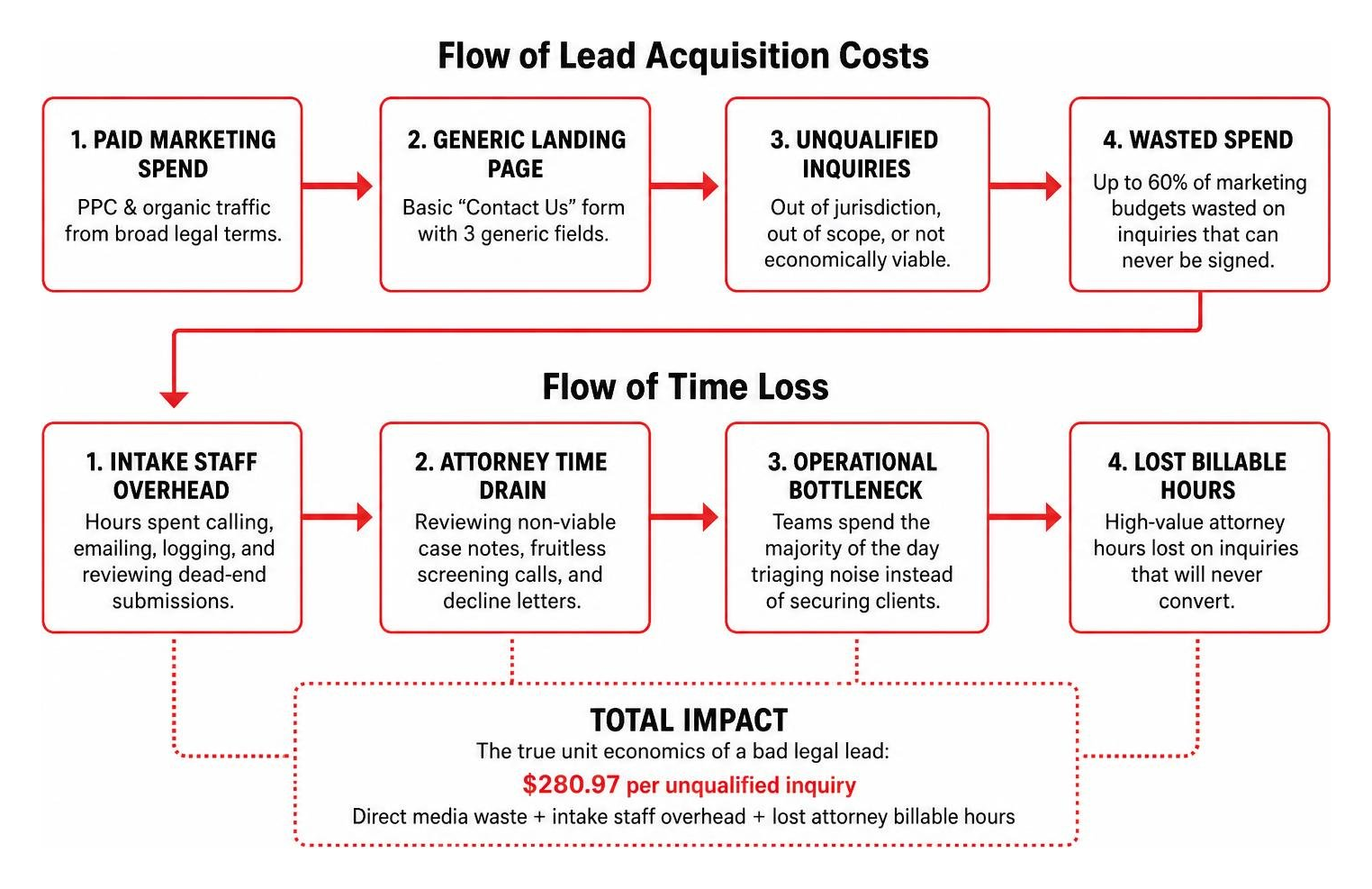
Industry studies show that law firms waste up to 60% of their marketing budgets generating and processing inquiries they can never sign. When landing pages fail to filter prospects up front, your team spends the majority of its working day triaging noise rather than securing valuable retainers.
High web traffic and healthy click-through rates often create a false sense of security. An ad campaign may boast a low cost-per-click (CPC) and hundreds of monthly form submissions, yet generate zero revenue growth. When volume is high but signed cases remain flat, the breakdown is happening right at the landing page conversion point.
At Triple Digital, our team helps law firms break this cycle through precision targeting and automated pre-qualification workflows that prioritize Cost Per Qualified Lead (CPQL) over vanity metrics. By filtering low-value inquiries directly on your landing page, you protect your firm’s billable hours, streamline staff workload, and ensure that paid media spend is evaluated against actual revenue generation.
What Pre-Qualification Elements Should You Place on Legal Landing Pages?
Filtering out poor-fit inquiries does not mean turning your landing page into a digital brick wall. Instead, it involves embedding strategic qualification signals that encourage ideal prospects to proceed while guiding mismatched visitors to self-disqualify before submitting their contact details.
To turn your page into an active screening filter, focus on five foundational design and messaging elements:
1. Intent-Driven, Jurisdiction-Specific Headlines
Generic slogans like “Excellence. Integrity. Results.” or “Dedicated Representation for Your Legal Needs” offer zero context. They fail to filter user intent and invite random inquiries.
Replace broad taglines with clear, jurisdiction-specific problem statements. For example:
- Weak: “Experienced Defense Lawyers on Your Side”
- Pre-Qualifying: “Defending Felony and Misdemeanor Charges in Harris County, Texas”
This immediately signals geographic boundaries and practice scope to prospective clients before they ever touch a form field.
2. Transparent Scope and Minimum Matter Parameters
Clearly stating what your firm does—and does not—handle prevents confusion. If your personal injury practice exclusively handles catastrophic injury claims and commercial vehicle collisions, state that explicitly. If your family law group requires a minimum retainer for contested asset division, presenting a concise summary of matter parameters helps visitors determine whether your services align with their situation.
Applying actionable landing page optimization strategies allows you to communicate these criteria clearly without alienating high-value prospects.
3. Immediate Proximity Trust and Confidentiality Signals
Prospective legal clients are often navigating sensitive, high-stress situations. Placing security assurances, encrypted data badges, and explicit confidentiality statements directly adjacent to interactive form fields reassures qualified visitors that their information is secure.
4. Clear Response Expectations
Uncertainty drives poor user behavior. When people do not know when a firm will contact them, they often submit forms across five competing websites. Adding a brief note such as “Qualified inquiries receive an attorney review within 15 minutes during standard business hours” establishes clear expectations and reduces duplicate, rushed submissions.
5. Ethical Disclaimers (ABA Model Rule 1.18 Compliance)
When gathering preliminary case details on a digital landing page, your firm must adhere to ethical duties regarding prospective clients under ABA Model Rule 1.18. Clearly post an intake disclaimer clarifying that submitting an inquiry does not form an attorney-client relationship or impose an obligation of confidentiality beyond applicable ethics rules.
The 5 Primary Pre-Qualification Gates to Embed on Your Page
To automate this screening process directly within your page structure, embed these five essential gates:
- Jurisdiction Gate: Confirms the county, state, or court district where the legal issue arose.
- Statute of Limitations / Incident Date Gate: Verifies that the matter falls comfortably within legal filing deadlines.
- Practice Scope Gate: Filters by specific legal sub-category (e.g., distinguishing between a workplace workers’ comp claim vs. a third-party liability claim).
- Economic Viability Gate: Evaluates core matter factors such as property damage thresholds, injury severity, or contested asset amounts.
- Conflict and Representation Status Gate: Confirms whether the prospect is currently represented by counsel or involved with opposing parties that create an ethical conflict.
How Do Interactive Multi-Step Workflows Outperform Static Contact Forms?
Traditional static contact forms convert only 3% to 7% of landing page traffic. Worse, they provide zero mechanism to screen the quality of those conversions. Presenting a visitor with a long, intimidating block of ten open form fields causes high bounce rates among top-tier prospects while attracting low-effort submissions from unqualified users.
Interactive multi-step workflows solve both challenges simultaneously. Industry data shows that interactive, conversational intake flows outperform traditional static contact forms 3:1 in conversion rates, with some practices seeing up to a 5x boost in qualified lead engagement.
Over 60% of all legal searches happen on mobile devices. A mobile user facing a traditional desktop-style form must pinch, zoom, and type out lengthy narratives on a small keyboard. In contrast, an interactive workflow breaks the screening process into bite-sized, single-action screens that use tap-friendly buttons, progress indicators, and progressive profiling.
By structuring question sequencing intentionally—placing simple, non-invasive qualifying questions early—you capture user engagement before requesting identifying personal data. Adopting interactive workflows is one of the most effective methods to increase conversion rates while filtering out non-viable inquiries before they reach your staff.
Static Contact Forms vs. Interactive Qualification Workflows
| Metric / Feature | Traditional Static Contact Form | Interactive Multi-Step Workflow |
|---|---|---|
| Average Conversion Rate | 3% – 7% | 12% – 25% |
| Mobile Drop-Off Rate | High (overwhelming layout) | Low (tap-to-select interface) |
| Lead Quality Screening | None (manual review required) | Automated (logic-based pre-qualification) |
| Data Cleanliness in CRM | Inconsistent narrative fields | Structured, mapped data fields |
| Intake Staff Workload | High (60% time on bad leads) | Low (focused on pre-qualified inquiries) |
| Statute of Limitations Checks | Manual post-submission check | Instant automated verification |
How Practice-Area-Specific Workflows Screen Inquiries Automatically
Generic screening questions fail because legal matters have vastly different qualification criteria depending on the practice area. A personal injury firm requires entirely different data points than a family law or business litigation group.
To filter leads effectively, customize your interactive questions by practice area:
- Personal Injury Screening Logic: Focus on incident date, physical injury severity (e.g., hospital treatment, surgery vs. property-damage-only), and insurance coverage verification. Inquiries involving no medical treatment or incidents exceeding the statute of limitations are automatically routed away.
- Family Law Screening Logic: Screen for geographic county jurisdiction, whether the matter is contested or uncontested, presence of minor children, and budget parameters for upfront retainer fees.
- Criminal Defense Screening Logic: Gate by charge severity (misdemeanor vs. felony), arrest date, pending court appearance dates, and current representation status.
When you build a case management intake form, you establish conditional logic rules. If a prospect selects an out-of-state county or an expired incident date, the system immediately presents an automated, polite decline screen or alternative referral resource, preventing the lead from ever entering your active intake queue.
How Can You Balance Lead Filtering Friction with Conversion Speed?

A common concern among managing partners is the friction paradox: if we ask too many qualifying questions, won’t we scare away valuable clients?
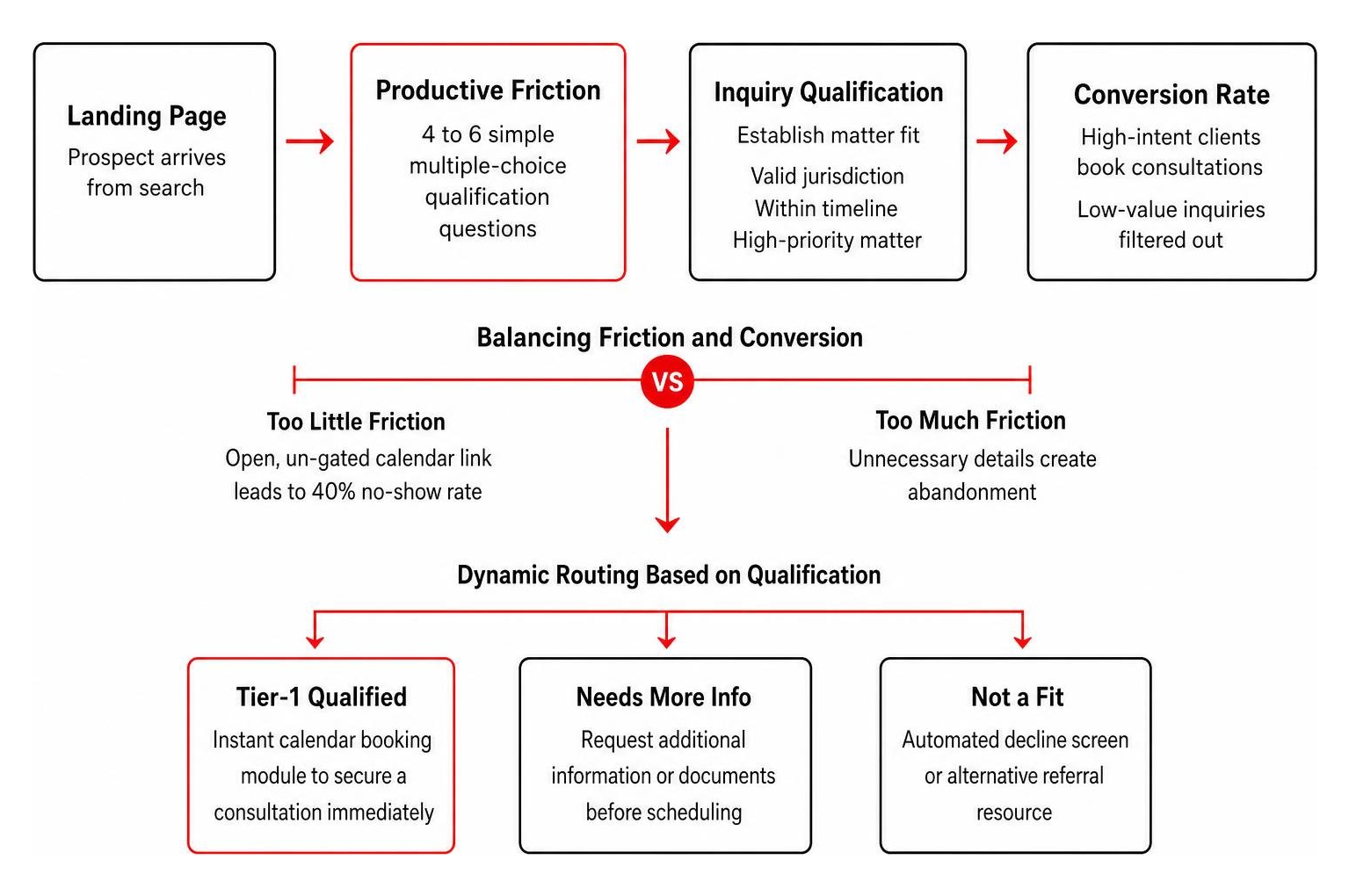
There is a distinct difference between unproductive friction (asking for unnecessary details like Social Security numbers or 500-word written essays) and productive friction (asking 4 to 6 simple multiple-choice questions that establish matter fit).
Completely frictionless booking—such as placing an open, un-gated calendar scheduling link directly on a public homepage—frequently results in a 40% no-show rate. Casual searchers book appointments without verifying whether their issue is viable, only to abandon the call or waste 30 minutes of an attorney’s schedule.
Requiring prospective clients to complete a concise, 60-second qualification sequence creates intentional micro-commitments. High-intent clients appreciate the thoroughness because it signals professionalism and organized case evaluation.
Speed-to-lead remains critical in digital marketing; most prospective clients hire the first responsive law firm they speak with. However, rapid response times are counterproductive if your intake personnel are racing to answer calls from individuals who cannot afford your retainer or whose claims have expired.
Balancing friction and speed involves implementing dynamic routing:
- Instant Calendar Integration for Tier-1 Qualified Inquiries: When a prospect meets all qualifying criteria (valid jurisdiction, within timeline, high-priority matter type), the workflow dynamically displays an instant calendar booking module to secure a consultation immediately.
- Standard Routing for Review Inquiries: Submissions requiring secondary review are routed to intake staff with full screening data attached.
- Instant Automated Decline for Disqualified Inquiries: Submissions outside your parameters receive an immediate, professional notification directing them to community resources or legal aid directories.
Applying conversion optimization tactics to lower acquisition costs allows your firm to deliver lightning-fast speed to high-value prospects without bogging down your team in low-value outreach.
How Can You Automate Routing, Scoring, and Decline Paths with CRM Integration?
A landing page qualification workflow is only as effective as the underlying systems that receive its data. When lead qualification is disconnected from your back-end operations, your team still ends up copying and pasting information between platforms.
Modern pre-qualification workflows integrate directly with client intake software for law firms, transforming unstructured web visits into categorized, prioritized opportunities.
1. Behavioral and Data-Driven Lead Scoring
Before an intake coordinator opens an inquiry, your CRM should assign a lead score based on landing page interactions and submitted criteria:
- High Score (Hot Lead): Matched exact jurisdiction + high-severity matter + incident within 30 days + completed workflow in under 90 seconds.
- Medium Score (Review Lead): Matched jurisdiction + unclear liability or timeline + detailed text submission.
- Disqualified Lead: Out-of-area IP address or location + expired statute of limitations + existing representation.
2. Algorithmic Optimization via Offline Conversion Tracking (OCT)
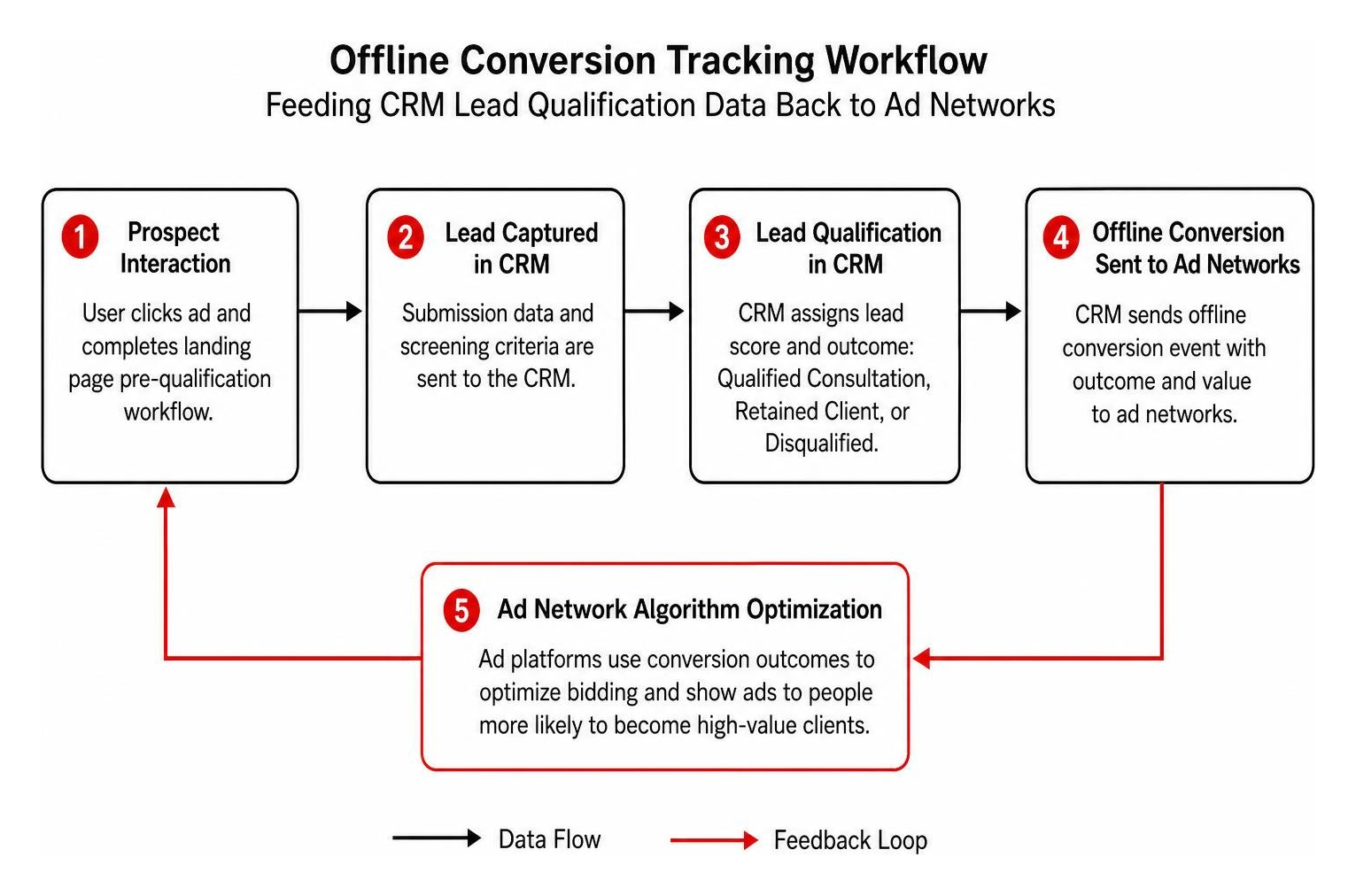
One of the most powerful advantages of digital pre-qualification is the ability to send structured qualification data back to advertising platforms like Google Ads and Meta.
When you only track raw form submissions as conversions, ad network algorithms optimize your campaigns to find more people who submit forms cheaply—even if those people are completely unqualified.
By utilizing Offline Conversion Tracking (OCT), your CRM signals back to Google Ads only when an inquiry is flagged as a Qualified Consultation or Retained Client. Over time, the ad platform’s machine-learning algorithms stop bidding on clicks that produce disqualified submissions and double down on searches that generate high-value cases.
Modernizing your approach through a structured intake management process eliminates intake bottlenecks, automates professional decline communications, and ensures your marketing investments build real equity.
What Common Landing Page Filtering Mistakes Drive Away High-Value Prospects?
While adding screening mechanisms is essential, poor execution can inadvertently depress conversion rates across your most lucrative practice areas. Avoid these frequent landing page pitfalls:
1. Overloading Initial Pages with Full Discovery Questionnaires
Pre-qualification is not formal discovery. Requiring prospects to upload police reports, list opposing counsel names, or answer 25 sequential questions on an initial visit causes high abandonment. Keep your initial landing page workflow strictly confined to 4 to 6 qualifying gates. Gather detailed case documentation after you have confirmed mutual fit.
2. Relying on Dense Legal Jargon
Prospective clients facing sudden legal distress rarely search using statutory terminology. Asking visitors to identify complex statutory classifications creates confusion. Frame all questions using simple, active-voice language.
3. Hiding Direct Calls-to-Action on Mobile
Over 60% of legal searchers are on mobile devices, and high-urgency prospects (such as those facing an active arrest or severe auto collision) often prefer to call immediately. Never bury your contact methods. Implement a persistent, sticky click-to-call button alongside your interactive workflow to ensure urgent, high-value cases can reach your intake line in a single tap.
4. Poor Technical Performance and Slow Page Load Speeds
Google Core Web Vitals require landing pages to achieve Largest Contentful Paint (LCP) in under 2.5 seconds and First Input Delay under 200 milliseconds. If your interactive form scripts cause page lag, stressed searchers will bounce to a competitor before your first qualifying question even loads.
Applying established web conversion optimization principles ensures that your site balances thorough pre-qualification filtering with smooth, mobile-optimized performance.
Frequently Asked Questions About Law Firm Landing Page Qualification
How many fields should a law firm landing page form have?
For optimal qualification and conversion balance, limit initial landing page forms or interactive workflows to 4 to 6 targeted questions. These should focus exclusively on jurisdiction, matter type, incident timeline, and contact information. Comprehensive case questionnaires should be deferred until post-qualification intake.
How does pre-qualifying leads on landing pages reduce consultation no-shows?
Pre-qualification forms require prospective clients to confirm essential details—such as incident location, matter details, and consultation availability. This intentional micro-commitment screens out uncommitted searchers and verifies matter viability, reducing no-show consultation rates by up to 40%.
What should you do with inquiries that are automatically disqualified?
Disqualified submissions should be routed to a polite, automated decline page that clearly states your firm cannot take the matter, suggests community legal aid directories or bar association referral services, and includes standard disclaimers confirming that no attorney-client relationship has been created.
Turn Your Legal Landing Pages into High-Value Case Acquisition Engines
Allowing your digital marketing campaigns to dump unvetted, low-value inquiries into your intake queue drains revenue, exhausts staff, and distorts your advertising performance.
By shifting from generic, passive “Contact Us” forms to active, multi-step pre-qualification landing pages, your firm can:
- Eliminate the $280.97 average financial loss associated with reviewing bad legal leads
- Reclaim up to 60% of wasted intake and administrative time
- Train paid ad algorithms to focus exclusively on prospects who become retained clients
- Deliver lightning-fast response times to your highest-value prospective cases
At Triple Digital, we specialize in cutting through marketing fluff to build high-performance lead generation and intake workflows that drive measurable caseload growth.
Ready to audit your firm’s landing page performance and eliminate unqualified inquiries before they reach your desk? Schedule a meeting with our growth team to discover how precision pre-qualification can transform your firm’s bottom line.