




Stop Losing Leads: Why Your Practice Needs Client Intake Software for Law Firms
The Real Cost of a Broken Process
Client intake software for law firms is a digital system that automates how your firm captures, qualifies, and onboards new clients — replacing paper forms, spreadsheets, and manual follow-ups with streamlined, automated workflows.
Here’s what the best legal intake software does:
- Captures lead information the moment someone visits your website — including after hours
- Qualifies prospects automatically using smart, conditional forms
- Runs conflict-of-interest checks before a consultation is ever booked
- Sends retainer agreements and collects e-signatures without staff involvement
- Syncs all data directly into your practice management system
There’s an old saying in legal marketing circles: “If you’ve been practicing law for very long at all, the word ‘intake’ may give you an instant headache.”
It’s not hard to see why.
The average law firm takes 42 hours to respond to an inbound web lead. But firms that respond within the first hour are 7 times more likely to qualify that lead than those who wait longer. Most firms are losing clients before they ever pick up the phone.
The problem isn’t effort. It’s process.
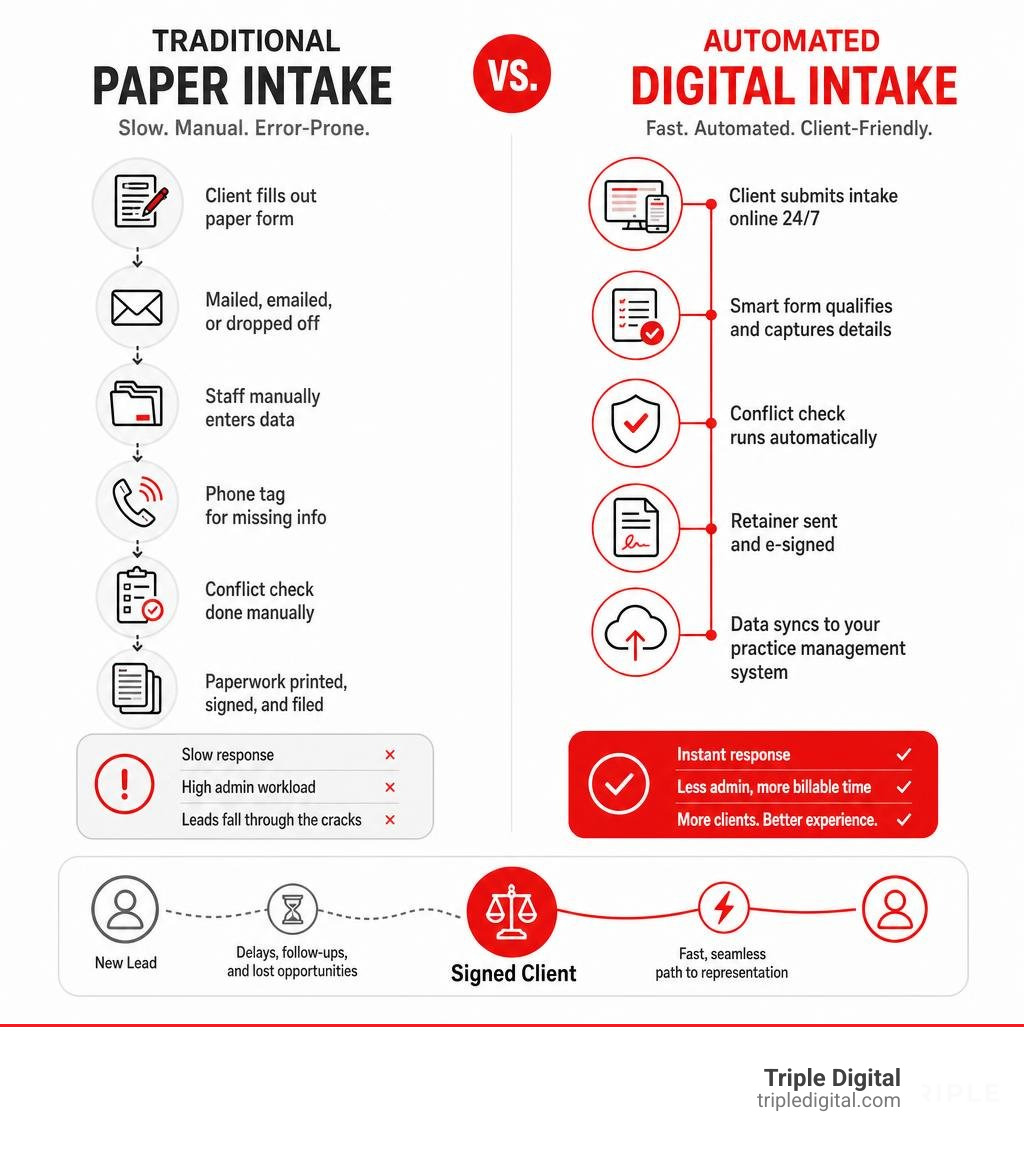
Manual intake — paper forms, phone tag, copy-pasting data into spreadsheets — creates bottlenecks at every step. Leads go cold. Staff burn hours on admin. And prospective clients, who found your firm on their phone during a lunch break, move on to the next result in Google.
In 2026, clients expect fast, frictionless, digital experiences. The firms winning new business are the ones that meet prospects where they are — instantly, automatically, and professionally.
That’s exactly what the right intake software makes possible.
What is Client Intake Software for Law Firms and Why Do You Need It?
At its core, client intake software for law firms is the bridge between a curious website visitor and a paying client. It is a dedicated system designed to handle the critical first phase of the client lifecycle: gathering case details, running conflict checks, checking for case-fit signals, and preparing the paperwork needed to officially begin representation.
Historically, law firms relied on paper files, physical intake sheets, or basic digital spreadsheets to keep track of new inquiries. But trying to run a modern, growing firm on spreadsheets is a recipe for chaos. Spreadsheets cannot send automated text reminders, they do not integrate with your calendar, and they certainly cannot draft an engagement letter automatically.
Transitioning from outdated paper systems to cloud-based digital record-keeping is no longer a luxury; it is a necessity for survival in 2026. Consider the statistics: 96% of potential clients use a search engine to find legal advice. Most of these prospects are searching on their mobile devices during their daily commutes or quick breaks. If they click on your website and find a static, clunky PDF form that they have to print, scan, and email back, they will immediately bounce to a competitor.
By implementing structured Legal Intake Process Steps, your firm can capture these leads instantly, organize their details in a centralized database, and make sure no potential client falls through the cracks. This level of structural optimization is directly linked to Enhancing Client Satisfaction And Firm Profitability Optimizing The Intake Process. When you make the onboarding experience effortless for the client, you build trust before they even speak to an attorney.
Key Features to Look For in Modern Intake Systems
Not all intake tools are created equal. If you want to automate your workflow without losing your personal touch, you need to know How To Choose The Best Law Firm Intake Software Without Losing Your Mind.
When evaluating software, keep an eye out for these essential features:
- Custom Form Builders: You should be able to build branded, clean forms that look professional and sit natively on your website.
- Conditional Logic (Smart Forms): Your forms should adapt dynamically based on user input. If a user selects “Personal Injury,” the form should show fields for accident details and insurance. If they select “Estate Planning,” it should pivot to ask about assets and beneficiaries. This keeps forms short, relevant, and engaging.
- Automated Scheduling: No one likes the back-and-forth calendar dance. Modern software integrates directly with your team’s calendars (like Google Calendar or Outlook), allowing qualified leads to book their own consultations instantly.
- Built-In e-Signatures: Getting a retainer signed should take seconds, not days. Built-in, mobile-friendly e-signature tools allow clients to review and sign agreements on their smartphones during a lunch break.
Essential Integrations for Client Intake Software for Law Firms
The true magic of intake software happens when it talks to the rest of your tech stack. To prevent your staff from copy-pasting data across five different systems, your intake tool must integrate seamlessly with:
- Legal CRM Systems: To track the status of every lead in a visual pipeline.
- Practice Management Software: To convert a qualified lead into an active matter with a single click.
- Billing and Payment Processors: To collect consultation fees or initial retainers upfront during the booking process.
If you are looking to build a highly efficient marketing engine, check out our Step By Step Guide To Lead Tracking Tools to see how these integrations keep your data clean and unified.
Conflict Checking and Lead Qualification Capabilities
Before you spend 30 minutes on a consultation call, you need to know two things: Does this person have a real case, and does representing them present an ethical conflict of interest?
Automated conflict checking is a massive safeguard for law firms. The best client intake platforms allow you to search your entire database of past, present, and prospective clients in seconds. By capturing opposing party details right inside the initial intake form, your staff can run a conflict check before a consultation is ever booked.
Furthermore, automated lead qualification helps you filter out the noise. By setting up pre-screening criteria, the software can automatically flag high-value cases, identify urgent statute-of-limitations issues, and gracefully redirect cases that do not fit your practice areas. To learn how to organize and prioritize these incoming opportunities, explore our guide on Law Firm Lead Tracking.
The Power of AI-Powered Intake vs. Traditional Static Forms
Let’s face it: nobody likes filling out long, boring forms. The longer and more complex your static contact form is, the higher your lead abandonment rate will be. If a prospect is forced to answer a wall of 15 generic questions on a mobile screen, they will likely close the tab.
This is where AI-powered conversational intake changes the game.
Instead of a passive form, conversational AI acts as an interactive, 24/7 digital receptionist on your website. It welcomes the visitor, asks friendly follow-up questions based on their answers, and guides them through the qualification process naturally.
The performance difference between these two approaches is staggering. For instance, Perspective AI reports an incredible 90% completion rate for its conversational intake interactions. Even better, their conversational AI captures an average of 25 to 30 messages per conversation, compared to a traditional static form which rarely gets completed if it asks more than 5 basic questions.
| Feature | Traditional Static Web Forms | Conversational AI Intake |
|---|---|---|
| User Experience | Passive, static, and often tedious | Interactive, natural, and conversational |
| Completion Rate | Low (drops off significantly with more fields) | High (up to 90% completion rates) |
| Depth of Context | Minimal (typically limited to 5 basic questions) | Deep (captures 25-30 interactive messages) |
| Follow-Up Capability | None (cannot ask clarifying questions) | Dynamic (asks adaptive follow-ups based on input) |
| Availability | Static (requires manual review later) | 24/7 instant qualification & scheduling |
By replacing your old contact forms with dynamic, conversational tools, you can dramatically improve your firm’s conversion rates. To understand the mechanics of turning website traffic into signed cases, check out our insights on From Clicks To Clients The Ultimate Law Firm Cro Strategy.
How Automation Streamlines the Onboarding Process
Every minute your staff spends manually drafting engagement letters, copy-pasting client names, or sending follow-up emails is a minute of unbillable time wasted.
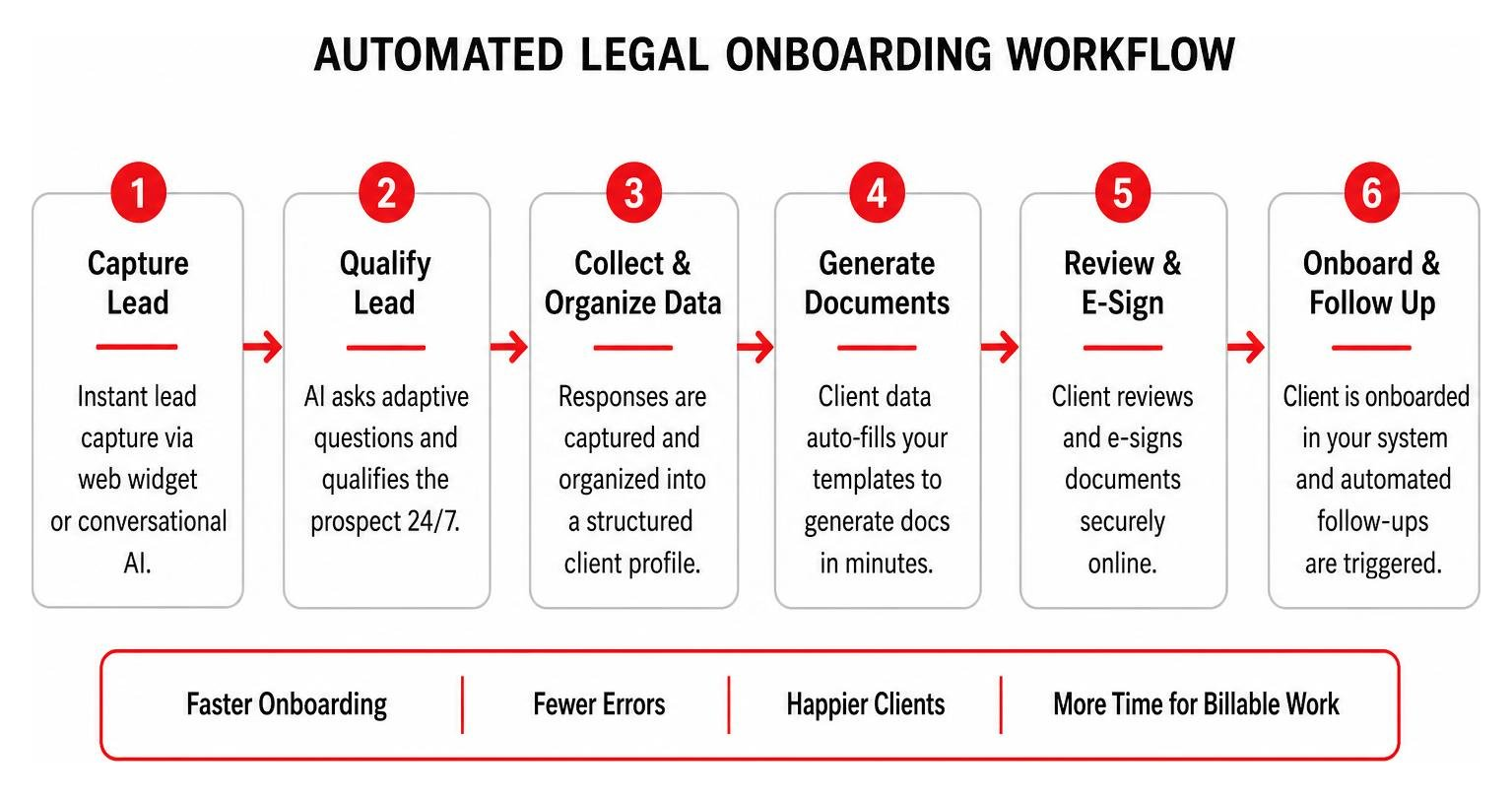
By leveraging document automation, modern intake software can pull client data directly from the completed intake questionnaire and inject it into your customized legal templates. Platforms like Rally can turn a process that normally takes an hour of manual drafting into a 6-minute automated task. For corporate transactional firms, this means reducing the time to draft complex documents — like IRA Operating Agreements — from 15 minutes down to just 45 seconds.
Similarly, Gavel has helped firms reduce their overall client intake and document generation time from over an hour to just 15 to 20 minutes.
These time savings are accompanied by a massive reduction in administrative headaches. For example, firms using Clio have reported increasing their monthly revenue by $30,000 to $50,000 simply by optimizing their lead capture. Additionally, by setting up automated text and email reminders for consultations, these firms reduced their appointment no-show rates from 20-25% to less than 5%, while cutting down average consultation times from 30 minutes to a highly-focused 10 minutes.
To explore how these individual automation tools can scale your entire practice, dive into our Detailed Guide To Automated Law Firm Growth.
Here is a quick look at the automated onboarding milestones your firm should aim to achieve:
- Milestone 1: Instant lead capture via web widget or conversational AI.
- Milestone 2: Automated pre-screening, conflict checking, and consultation scheduling.
- Milestone 3: Auto-generation of practice-area-specific retainer agreements.
- Milestone 4: Instant mobile-friendly e-signature collection.
- Milestone 5: Automated data sync to your back-end practice management system.
How to Evaluate Client Intake Software for Law Firms by Practice Area
The ideal client intake software for law firms depends heavily on what kind of law you practice. A personal injury firm has completely different intake needs than an estate planning attorney or a criminal defense practitioner.
- Personal Injury: You need high-volume lead capture, instant qualification, and statute-of-limitations tracking. Because injury leads often search for help outside of normal business hours, a 24/7 conversational AI tool is essential to prevent them from calling a competitor.
- Family Law: Family law cases are highly sensitive. You need dynamic, smart forms that allow clients to securely upload financial documents and share detailed custody preferences at their own pace.
- Estate Planning: Estate planning firms thrive on deep data collection. You need software that integrates with document assembly tools, allowing you to generate wills, trusts, and healthcare directives directly from the intake data.
- Criminal Defense: Speed is everything. You need automated SMS routing so that when a lead comes in, your team is notified instantly on their mobile phones to initiate a one-click callback.
Tailoring your intake process to your specific practice area is one of the most effective ways to Increase Conversion Rate Law Firms. When your forms ask highly relevant, practice-specific questions, prospects feel understood and are far more likely to hire your firm.
Security and Compliance Considerations for Legal Intake
As lawyers, we hold a strict fiduciary duty to protect confidential client information. When you move your intake process to the cloud, data security and ethical compliance must be your top priorities.
To comply with the American Bar Association (ABA) guidelines and local bar rules, your client intake software must utilize bank-grade security protocols. This means your data must be encrypted both in transit (using TLS 1.2 or higher) and at rest (using AES-256 database encryption).
Furthermore, if your firm operates in regions governed by strict privacy laws, your software must be fully compliant with regulations like the California Consumer Privacy Act (CCPA) and international standards like PIPEDA. Ensure your software provider performs regular third-party penetration testing and maintains secure, segregated backups (ideally every 6 hours) to protect your firm against data loss or cyber threats.
Frequently Asked Questions About Legal Intake Software
What is the difference between all-in-one platforms and specialized intake tools?
All-in-one legal practice management platforms (like Clio or MyCase) offer built-in intake modules that connect directly to your case files, billing, and document storage. The benefit is simplicity; there are fewer moving parts and everything lives in one system.
Specialized intake tools and legal CRMs (like Lawmatics, Law Ruler, or conversational AI widgets), on the other hand, offer much deeper marketing automation, advanced visual pipelines, and sophisticated lead nurturing features. While they require integration with your practice management software, they are often much more powerful at converting cold leads into paying clients. To compare your options, take a look at our breakdown of 10 Lead Tracking Software.
How does client intake software help with lead qualification?
Client intake software helps you qualify leads by using customized pre-screening questions and conditional logic. Instead of treating every web submission the same, the software automatically evaluates case-fit signals, checks for conflicts of interest, and verifies the jurisdiction.
This ensures your attorneys only spend their valuable billable hours on cases that are highly qualified and profitable. For a deeper look at optimizing your conversion funnel, read our Guide Conversion Optimization.
Is cloud-based client intake software secure and compliant?
Yes, reputable legal intake software is designed specifically to meet the high security standards required of the legal profession. Look for platforms that offer AES-256 encryption, TLS 1.2 in transit, SOC 2 compliance, and regular automated backups. Always verify that your software provider does not use your confidential client communication data to train public AI models.
Scale Your Case Acquisition with Triple Digital
Optimizing your client intake process is the single most cost-effective way to grow your law firm. But to get those high-value leads into your intake pipeline in the first place, you need a marketing strategy that targets the right cases with surgical precision.
At Triple Digital, we are a Houston-based digital marketing agency specializing in lead generation and case acquisition for ambitious law firms. Our USP is simple: we deliver a results-driven, “less fluff, more cases” approach. We leverage advanced AI, data mining, and localized SEO strategies to target the exact cases your firm wants to sign.
By combining our high-precision lead generation with a streamlined, automated client intake workflow, your firm can stop chasing dead ends and start signing high-value cases on autopilot. Let’s work together on Enhancing Client Satisfaction And Firm Profitability Optimizing The Intake Process.
Ready to scale your practice and reclaim your billable hours? Reach out to the team at Triple Digital today, and let’s build a case acquisition engine that works as hard as you do.